












































































































































































































































































































































































































































































Manual Enumeration
https://www.exploit-db.com/docs/english/46990-active-directory-enumeration-with-powershell.pdf
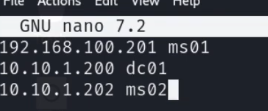
It's probably worth resolving IPs to domain names/network names in /etc/hosts
22.2.1 - nmap
nmap -p80 --min-rate 1000 10.11.1.20-24 #looking for initial foothold
nmap -p88 --min-rate 1000 10.11.1.20-24 #looking for DC
22.2.2 - Initial Impacket Enumeration
impacket-GetADUsers -dc-ip 192.168.214.122 "exampleH.example/" -all
Creds
impacket-GetADUsers -dc-ip 192.168.214.122 exampleH.example/fmcsorley:CrabSharkJellyfish192 -all
22.2.3 - AD manual enumeration
https://www.exploit-db.com/docs/english/46990-active-directory-enumeration-with-powershell.pdf
https://viperone.gitbook.io/pentest-everything/everything/everything-active-directory/ad-enumeration
Print out users in a domain
net users
Inspect a specific user in a domain
net user admin /domain
Enumerate groups in a domain
net group /domain
net group [groupname] /domain
Get all computers in the domain
net view
net view /domain
Get resources and shares of a specified computer
net view \\[computer_name] /domain
Domain Controller hostname (PdcRoleOwner)
[System.DirectoryServices.ActiveDirectory.Domain]::GetCurrentDomain()
Look for IPs your machine is connected to, as well as looking for a dual-victim machine typically on the 2 IPs will show.
arp -a
ipconfig
22.2.4 - Credential Hunting
Interesting files
Get-ChildItem -Path C:\ -Include *.kdbx -File -Recurse -ErrorAction SilentlyContinue
Get-ChildItem -Path C:\xampp -Include *.txt,*.ini -File -Recurse -ErrorAction SilentlyContinue
Get-ChildItem -Path C:\Users\USERD\ -Include *.txt,*.pdf,*.xls,*.xlsx,*.doc,*.docx -File -Recurse -ErrorAction
tree /f C:\Users\
Are credentials cached?
HKEY_LOCAL_MACHINE\SOFTWARE\Microsoft\Windows NT\CurrentVersion\Winlogon
        CachedLogonsCount
22.2.5 - AD Enumeration with PowerView
Import-Module .\powerview.ps1
. .\PowerView.ps1
Run if importing the module fails, then try importing again.
powershell -exec bypass
Basic information about the domain (using PowerView)
Get-NetDomain
Enumerate Users
List of users in a domain. This auto-enumerates all attributes on the user objects so it can be worth piping the output to the select statement.
Get-NetUser
Enumerate all users and show only usernames
Get-NetUser | select cn
Get-NetUser | select cn,pwdlastset,lastlogon
Is our current user local admin somewhere?
Invoke-CheckLocalAdminAccess -ComputerName targethostname
Extract a specific attribute from a user
Get-UserProperty -Properties <Properties>
Check users with SMB RID cycling (useful if you have no LDAP) (PowerView)
Invoke-RIDBrute -Domain target.local
Identify dormant users (PowerView)
Get-DomainUser -Properties lastlogon, lastlogontimestamp |
    Where-Object {($_.lastlogontimestamp -ne $null) -and
    (([datetime]::FromFileTime($_.lastlogontimestamp)) -lt (Get-Date).AddDays(-90)) } |
    Select-Object samaccountname, @{Name="LastLogonDate";Expression={[datetime]::FromFileTime($_.lastlogontimestamp)}}
Check local session logs or login history
Get-NetSession -ComputerName target
Get-NetLoggedon -ComputerName target
Check for kerberoastable users
Get-NetUser -SPN
Get-NetUser -SPN | select serviceprincipalname
Get-NetUser -SPN | ?{$_.memberof -match 'Domain Admins'}
Enumerate Groups
Get-NetGroup can be utilized similarly
Get-NetGroup | select cn
Get-NetGroup "Sales Department" | select member
Get-NetGroupMember -GroupName "Sales Department"
Get-NetGroup -GroupName "admin"
Ask DC for all computers, and asks every compute if it has admin access (very noisy). You need RCP and SMB ports opened.
Find-LocalAdminAccess
Forest-wide enum
Get-NetForest
List DCs
Get-NetDomainController
Retrieve the domain SID (useful for building SIDs manually)
Get-DomainSID
22.2.6 - Enumerate AD using PowerShell and .NET Classes
AD enumeration relies on LDAP. When a domain machine searches for an object, like a printer, or when we query user or group objects, LDAP is used as the communication channel for the query. In other words, LDAP is the protocol used to communicate with Active Directory. We're looking for the PDC (Primary Domain Controller with the PDCRoleOwner property)
Example of Common Name & Domain Name in LDAP format
CN=Stephanie,CN=Users,DC=corp,DC=com
Invoke the domain class from System.DirectoryServices.ActiveDirectory namespace
[System.DirectoryServices.ActiveDirectory.Domain]::GetCurrentDomain()
Use ADSI directly to get the Domain Name
([adsi]'').distinguishedName
22.2.7 - Adding search functionality to the script
This PowerShell script invokes .NET classes to run queries against AD via LDAP.
function LDAPSearch {
    param (
        [string]$LDAPQuery
    )

    $PDC = [System.DirectoryServices.ActiveDirectory.Domain]::GetCurrentDomain().PdcRoleOwner.Name
    $DistinguishedName = ([adsi]'').distinguishedName

    $DirectoryEntry = New-Object System.DirectoryServices.DirectoryEntry("LDAP://$PDC/$DistinguishedName")

    $DirectorySearcher = New-Object System.DirectoryServices.DirectorySearcher($DirectoryEntry, $LDAPQuery)

    return $DirectorySearcher.FindAll()

}
Run the script
Import-Module .\function.ps1
LDAPSearch -LDAPQuery "(samAccountType=805306368)"
LDAPSearch -LDAPQuery "(objectclass=group)"
We can enumerate every group available in the domain and display the user members, we can pipe the output into a new variable and use a foreach loop that will print each property for a group. This allows us to select specific attributes we are interested in.
foreach ($group in $(LDAPSearch -LDAPQuery "(objectCategory=group)")) {
>> $group.properties | select {$_.cn}, {$_.member}
>> }
Search for a group using the script, then pipe it to a variable in the PS command line, then print our member attribute (for example)
$sales = LDAPSearch -LDAPQuery "(&(objectCategory=group)(cn=Sales Department))"
$sales.properties.member
If, for example the management department is a member of the development department, we have an example of a nested group, here we're printing the member attribute on the Management Department group object.
$group = LDAPSearch -LDAPQuery "(&(objectCategory=group)(cn=Management Department*))"
22.2.8 - ACL Delegation & Delegation Enumeration
Dump all ACEs for a user or group
Get-ObjectAcl -Identity <user>/<group>
Find GenericAll privs (typically easier with BloodHound but possible to do here)
Get-ObjectAcl -Identity "Management Department" | ? {$_.ActiveDirectoryRights -eq "GenericAll"}
Locate interesting ACLs in the domain
Find-InterestingDomainAcl
Get-ObjectAcl -SamAccountName TARGET_USER_OR_GROUP -ResolveGUIDs
22.2.9 - SID -> Name Translation
Translate SID to user/group name
Convert-SidToName S-1-5-21-...-1104
Get SID of a specific user
Convert-NameToSid username
22.2.10 - Bloodhound
Bloodhound.py for remote retrieval
/opt/BloodHound.py/bloodhound.py -d exampleH.example -u fmcsorley -p CrabSharkJellyfish192 -c all -ns 192.168.214.122
Delete old shizzle
MATCH (n) DETACH DELETE n;